
Configuration reference
This page lists every setting of Musonic Server, for the person who installs and runs it. Most people never need more than the music folder and the console: everything else has a sensible default.
Where settings come from
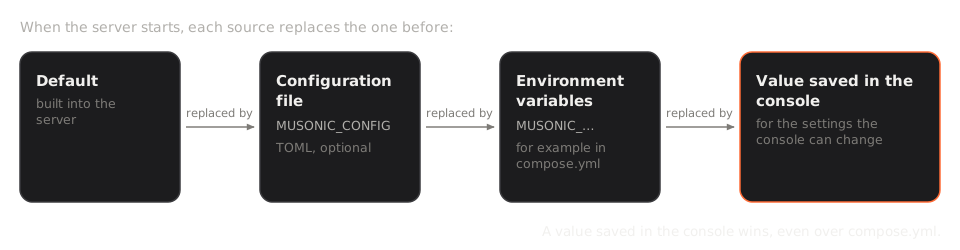
Section titled “Where settings come from”A setting can be given in four places. When the server starts, each one overrides the one before:
- The default built into the server.
- The configuration file, if
MUSONIC_CONFIGpoints to one (TOML format). - The environment variables (
MUSONIC_…), for example incompose.yml. - The value saved from the console, for the settings the console can change.
Settings are read once, when the server starts. After changing compose.yml or the file, restart: docker compose up -d (it recreates the container when its settings changed).
With Docker or with the file
Section titled “With Docker or with the file”services: musonic-server: image: ghcr.io/doodzdev/musonic-server:1 environment: RUST_LOG: info MUSONIC_IMPORT_QUALITY: flac MUSONIC_BACKUP_DAYS: "30"Put true and false in quotes ("false"): Compose refuses them bare.
bind = "0.0.0.0:4533"data_dir = "/var/lib/musonic"music_dir = "/srv/music"import_quality = "flac"backup_days = 30Start the server with MUSONIC_CONFIG=/etc/musonic/server.toml. Keys left out keep their default. Secrets never go in this file: they are environment variables only.
All settings
Section titled “All settings”Yes/no values: in the environment, 1, true, yes and on mean yes (any case); anything else means no. An empty variable is ignored.
Addresses and folders
Section titled “Addresses and folders”| Variable | File key | Type | Default | Effect |
|---|---|---|---|---|
MUSONIC_CONFIG |
— | path | none | Configuration file to read (TOML). |
MUSONIC_BIND |
bind |
address:port | 127.0.0.1:4533 (Docker image: 0.0.0.0:4533) |
Address and port the server listens on. |
MUSONIC_DATA_DIR |
data_dir |
path | data (Docker image: /data) |
Database, caches, backups. See The data folder. |
MUSONIC_MUSIC_DIR |
music_dir |
path | none (Docker image: /music) |
Root of the music library. Without it, the library stays empty. |
MUSONIC_ADMIN_DIR |
admin_dir |
path | admin next to the program, else /usr/share/musonic/admin |
Folder of the built console. Without one, the address shows a short page instead. |
MUSONIC_HOST_NET_DEV |
host_net_dev |
path | /host/net/dev |
The machine’s /proc/net/dev seen from a container, to count the whole machine’s traffic on the Data screen. |
MUSONIC_FFMPEG |
— | path | ffmpeg |
The ffmpeg program used to transcode. |
Library
Section titled “Library”| Variable | File key | Type | Default | Effect |
|---|---|---|---|---|
MUSONIC_SCAN_INTERVAL_MINUTES |
scan_interval_minutes |
minutes | 60 |
Time between scheduled scans. 0 = none: changes in the folder are picked up as they happen anyway. |
Online catalog, providers and imports
Section titled “Online catalog, providers and imports”| Variable | File key | Type | Default | Effect |
|---|---|---|---|---|
MUSONIC_ONLINE |
online |
yes/no | yes | Online catalog in search and pages (metadata from Deezer’s public API). |
MUSONIC_ONLINE_PREVIEWS |
online_previews |
yes/no | yes | Play the 30-second preview of an online song no provider has. |
MUSONIC_DEEZER_API_URL |
deezer_api_url |
URL | https://api.deezer.com |
Address of that API. Only for tests. |
MUSONIC_SUBSONIC_PROVIDER_URL |
subsonic_provider_url |
URL | none | Another Subsonic-compatible server to relay audio from. |
MUSONIC_SUBSONIC_PROVIDER_USER |
subsonic_provider_user |
text | none | Its account name. Required with the URL. |
MUSONIC_SUBSONIC_PROVIDER_PASSWORD |
— | text | none | Its password. Environment only. Required with the URL. |
MUSONIC_IMPORT |
import |
yes/no | yes | Import online songs as files when they are liked or added to a playlist (needs a provider that imports). |
MUSONIC_IMPORT_DIR |
import_dir |
folder name | Musonic |
Folder of the imports, inside the music folder. |
MUSONIC_IMPORT_QUALITY |
import_quality |
mp3_128, mp3_320, flac |
mp3_320 |
Highest quality of imported files (the best the provider has, up to it). |
How providers work is described in PROVIDERS.md.
Playback
Section titled “Playback”| Variable | File key | Type | Default | Effect |
|---|---|---|---|---|
MUSONIC_MAX_BIT_RATE |
max_bit_rate |
kbit/s | 0 (no limit) |
Highest streaming bit rate for every account. An account’s own limit wins when lower. |
MUSONIC_TRANSCODE_FORMAT |
transcode_format |
mp3, opus, aac |
mp3 |
Format of the smaller streams when the app asks no format. |
MUSONIC_TRANSCODE_CACHE_MB |
transcode_cache_mb |
MB | 500 |
Transcoded songs kept on disk (0 = none), so that playing again or seeking is immediate. |
Security and accounts
Section titled “Security and accounts”| Variable | File key | Type | Default | Effect |
|---|---|---|---|---|
MUSONIC_LEGACY_AUTH |
legacy_auth |
yes/no | yes | Accept the Subsonic token sign-in (t + s) used by many apps. It needs the password kept encrypted next to its hash. Off = only password, device key and session sign-ins. |
MUSONIC_TRUSTED_PROXIES |
trusted_proxies |
list | this machine and private networks | Proxies whose CF-Connecting-IP and X-Forwarded-For the server believes, to know a visitor’s address (wrong-password limit, journal): addresses or networks separated by commas (127.0.0.1, 172.16.0.0/12), or none. A request from anywhere else is counted under its own address, whatever it sends. Set none if the server’s port is open to the internet without a proxy in front, and add Cloudflare’s networks if Cloudflare reaches the server directly (proxied DNS, no tunnel). |
MUSONIC_SECRET_KEY |
— | 64 hexadecimal characters | secret.key in the data folder, created on first start |
Key that encrypts the passwords kept for the token sign-in. Environment only. |
MUSONIC_PASSWORD |
— | text | none | Password for musonic-server user add, instead of typing it. |
Maintenance
Section titled “Maintenance”| Variable | File key | Type | Default | Effect |
|---|---|---|---|---|
MUSONIC_BACKUP_DAYS |
backup_days |
days | 14 |
Daily database backups kept in backups/ of the data folder. 0 = no daily backup. |
MUSONIC_UPDATE_CHECK |
update_check |
yes/no | yes | Look on GitHub every 6 hours for newer versions of the server and of Musonic Web. Nothing is installed. |
RUST_LOG |
— | filter | info,lofty=error |
How much the logs say. See Logs. |
Podcasts
Section titled “Podcasts”| Variable | File key | Type | Default | Effect |
|---|---|---|---|---|
MUSONIC_PODCASTINDEX_KEY |
— | text | none | Podcast Index API key. Both key and secret are needed. It can also be set in the console (Imports screen). |
MUSONIC_PODCASTINDEX_SECRET |
— | text | none | Podcast Index API secret. |
The YouTube Data API key used for YouTube Music playlist imports has no variable: it is set in the console (Imports screen) and stored in the database.
Settings changed from the console
Section titled “Settings changed from the console”These settings can be changed from the console. The value is stored in the database (musonic.db) and applied at the next restart, which the console offers. Addresses, folders and secrets are never changeable from a web page.
| Setting | Console screen | Console label | Allowed values |
|---|---|---|---|
import |
Imports | Automatic import | on / off |
import_quality |
Imports | Quality | MP3 128, MP3 320, FLAC |
online |
Imports | Online catalog | on / off |
online_previews |
Imports | 30-second previews | on / off |
scan_interval_minutes |
Library | Automatic scan | 0 to 10,080 (the console offers 0, 60, 360, 1440) |
max_bit_rate |
Playback | Highest bit rate by default | 0 to 320 (the console offers none, 320, 256, 192, 128, 96) |
transcode_format |
Playback | Format of smaller songs | MP3, Opus, AAC |
transcode_cache_mb |
Playback | Transcoded songs | 0 to 100,000 (the console offers 0, 250, 500, 1000, 2000, 5000) |
legacy_auth |
Devices and security | Legacy Subsonic sign-in | on / off |
backup_days |
Settings and maintenance | Days kept | 0 to 365 (the console offers 0, 3, 7, 14, 30, 90) |
update_check |
Settings and maintenance | Check for updates | on / off |
Also stored in the database, and applied at once (no restart):
- the providers’ credentials, the Podcast Index key and the YouTube Data API key (Imports screen);
- the monthly outbound limit (Data screen);
- the maximum size of the activity log (Settings and maintenance; 50 MB by default, 1 MB at least);
- each account’s rights and quotas.
Port and addresses
Section titled “Port and addresses”- The server listens on port 4533. Outside Docker, it listens only on
127.0.0.1(the machine itself) unless you changeMUSONIC_BIND. - In Docker, the image listens on
0.0.0.0:4533inside the container, and the examplecompose.ymlpublishes it on127.0.0.1:4533of the machine: only the machine itself can reach it, and a reverse proxy with HTTPS serves it to the outside. - What the address serves:
| Path | What |
|---|---|
/ |
The administration console (and its link pages /invite/…, /reset/…) |
/app/ |
Musonic Web, once installed from the console |
/rest/… |
The Subsonic / OpenSubsonic API |
/v1/… |
The Musonic API |
/health |
{"status":"ok"} when the server and its database answer (used by the Docker healthcheck) |
To use another port with Docker, change the left side of ports, for example "127.0.0.1:8080:4533".
The data folder
Section titled “The data folder”Everything the server writes, apart from imported music, is in the data folder (/data in Docker, the ./data folder next to compose.yml):
| Path | What | Back it up? |
|---|---|---|
musonic.db |
The database: accounts, likes, playlists, plays, settings, providers’ credentials | Yes |
musonic.db-wal, musonic.db-shm |
Working files of the database while it runs | Copied with it, never alone |
secret.key |
The key encrypting the passwords kept for the Subsonic token sign-in (when MUSONIC_SECRET_KEY is not set) |
Yes |
events.db |
The activity and administration log | Optional |
backups/musonic-YYYY-MM-DD.db |
The daily database backups | Yes, to another disk |
musonic.db.before-schema-N |
A copy of the database made just before an update changed its structure | Optional |
cache/covers/ |
Resized covers | No, made again |
cache/transcoded/ |
Transcoded songs | No, made again |
tmp/streams/ |
Online songs being played | No |
web/ |
Musonic Web, when installed from the console | No, installed again |
- The server writes its logs to the standard output. With Docker:
docker compose logs -f musonic-server. The examplecompose.ymlkeeps 3 files of 10 MB. - The console shows the last 2,000 lines since the last start, in Settings and maintenance → Server logs.
RUST_LOGsets how much is written. Common values:
| Value | What you get |
|---|---|
info |
Normal: start, scans, backups, warnings and errors (the default is info,lofty=error, which hides the tag reader’s notes about every file) |
warn |
Warnings and errors only |
error |
Errors only |
debug |
Much more detail, to investigate a problem |
info,musonic_server=debug |
Detail for the server only |
Command line
Section titled “Command line”The same program also runs one-off commands. With Docker, prefix them with docker compose exec musonic-server.
| Command | What it does |
|---|---|
musonic-server |
Starts the server. |
musonic-server user add <name> [--admin] |
Creates an account. Asks for the password, or reads MUSONIC_PASSWORD. |
musonic-server scan [--full] |
Scans the library once and prints a summary. |
musonic-server import-navidrome <navidrome.db> [--replace-playlists] [--new-ids] |
Imports playlists, likes and plays from a copy of a Navidrome database. |
<name> is the account’s name; <navidrome.db> the path to the copy of the Navidrome database.