
Coming from Navidrome
This page is for you if you already run Navidrome and want to try Musonic Server, or move to it. It tells you honestly what Musonic does and does not do compared with Navidrome, what the import brings over, and how to switch without losing anything.
What you need
- Your running Navidrome, and access to the machine it runs on (a terminal).
- The
sqlite3program on that machine, to copy Navidrome’s database safely (on Debian or Ubuntu: packagesqlite3). If you cannot install it, you can stop Navidrome for a minute instead (see step 2). - About 30 minutes, plus the time of a first scan of your library.
What carries over, and what does not
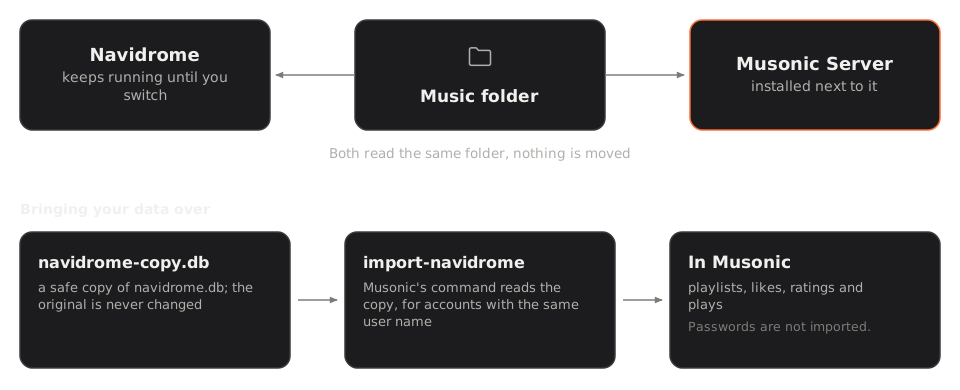
Section titled “What carries over, and what does not”The command musonic-server import-navidrome reads a copy of navidrome.db (opened read-only) and brings over the data of the accounts that exist in Musonic under the same user name (upper and lower case do not matter).
| Navidrome data | Imported? | Details |
|---|---|---|
| Playlists | Yes | Name, comment, public or not, creation and update dates, order of the songs. A song whose file is not in the Musonic library is left out (counted in the report). |
| Likes (stars) | Yes | On songs, albums and artists, with the date of the like. |
| Ratings | Yes | On songs, albums and artists. |
| Play counts and last play date | Yes | On songs, albums and artists. |
| Play history | Yes | Each play recorded by Navidrome becomes a play in Musonic. |
| Song and playlist ids | Kept by default | Songs and playlists take the id they had in Navidrome, in Musonic’s short form (its first 11 characters); the server still answers to the full id, so what the apps saved (downloads, caches) keeps working. --new-ids gives them new ones instead. |
| Album and artist ids | No | Musonic computes them from the tags. |
| Accounts | No | You create them in Musonic first, with the same user names (step 6). |
| Passwords | Never | The import does not read them. Each person gets a new password in Musonic. |
| Administrator rights | No | You choose them when you create each account. |
| Play queue, bookmarks, shares | No | Not read by the import. |
| Smart playlists | Partly | Their rules are not imported. The playlist comes over with the songs listed in it in the copy, as a regular playlist. |
| Settings (transcoding, players, scrobbling links) | No | Musonic has its own settings. |
How songs are matched. Navidrome and Musonic both record each file by its path inside the music folder. The import looks for the same path first, then the same path ignoring upper and lower case and accents. This is why Musonic must use exactly the same music folder as Navidrome (the same root, not a parent or a subfolder).
Accounts that do not exist in Musonic. They are skipped, and listed under users_skipped in the report. Nothing of theirs is imported. Create the account, then run the import again.
Running it again is safe: nothing is added twice.
- Playlists already imported are left as they are.
--replace-playlistsimports them again, replacing them. - A like keeps its first date.
- A rating you already set in Musonic is kept.
- Play counts keep the higher value.
- A play already imported is not added again.
Navidrome and Musonic compared
Section titled “Navidrome and Musonic compared”Both are music servers that speak the Subsonic API: the Subsonic apps you use today work with both. They do not make the same choices. The Navidrome column follows Navidrome’s documentation; check it for details, as Navidrome changes too.
| Feature | Navidrome (according to its documentation) | Musonic Server 1.2.1 |
|---|---|---|
| Subsonic / OpenSubsonic API | Yes | Yes |
| Transcoding with ffmpeg | Yes | Yes (MP3 by default, transcode_format / MUSONIC_TRANSCODE_FORMAT) |
| Smart playlists (rules) | Yes | No |
| Several music libraries | Yes | No: one music folder |
| Last.fm / ListenBrainz scrobbling | Yes | No: plays are counted on the server only |
| Public share links | Yes | No |
| ReplayGain | Yes | No |
| Jukebox mode (playback on the server) | Yes | No |
| Sign-in by a reverse proxy header | Yes | No |
Importing .m3u playlists |
Yes | No |
| Plugins | Yes | No: audio sources are built into the server |
| Web interface | Yes, its own | Yes: Musonic Web, served by the server |
| Its own Android app | Not described | Yes: Musonic for Android |
| Administration | In its web interface | A separate admin console, served by the server |
| Accounts with roles | Yes (administrators, users) | Yes (administrators, users), with quotas |
| One key per device, revocable | Not described | Yes |
| Real-time sync between devices (likes, playlists, queue) | Not described | Yes |
| Online catalogue (artists and albums you do not have) | Not described | Yes: metadata and 30-second previews |
| Importing a playlist from a link | Not described | Yes |
| Podcasts | Not described | Yes |
| Importing data from Navidrome | Not applicable | Yes (this page) |
On speed and memory, the benchmark page gives measures of both servers on the same library, including those where Navidrome is ahead.
Migrate step by step
Section titled “Migrate step by step”-
Write down how your Navidrome is set up.
You need four things:
- its version (shown in Navidrome’s web interface, in the “About” window);
- the path of your music folder (Navidrome’s
MusicFoldersetting, or the/musicvolume of its container); - the path of its database
navidrome.db, in its data folder (DataFolder, or the/datavolume of its container); - the apps each person uses (Musonic, Symfonium, Substreamer…), to reconnect them at the end.
-
Make a safe copy of Navidrome’s database.
Run this on the machine of Navidrome, Navidrome can keep running:
Terminal window sqlite3 -readonly <path-to>/navidrome.db ".backup navidrome-copy.db"<path-to>is the data folder you wrote down. This writes a consistent copy,navidrome-copy.db, in the current folder. Do not copy the file withcpwhile Navidrome runs: the copy may be incomplete.Without
sqlite3: stop Navidrome, copynavidrome.dbwithcp, then start Navidrome again. -
Install Musonic Server next to Navidrome, on the same music folder.
Follow Install the server with Docker, with two changes:
- give it the same music folder as Navidrome. You can mount it read-only (
:ro): the scan only reads it (only the import of online songs writes into it); - give it another port: Navidrome already uses 4533 by default, so the two cannot both listen on it.
ports:- "127.0.0.1:4534:4533" # Musonic on 4534 while Navidrome keeps 4533volumes:- ./data:/data- /path/to/music:/music:ro # the same folder as NavidromeWithout Docker, set
MUSONIC_BIND=127.0.0.1:4534andMUSONIC_MUSIC_DIRto the same folder. - give it the same music folder as Navidrome. You can mount it read-only (
-
Create the administrator account with your Navidrome user name.
Terminal window docker compose exec musonic-server musonic-server user add <name> --admin<name>is your user name in Navidrome: this way, your playlists and likes come over to this account. The command asks for the password. -
Wait for the first scan to finish.
The server scans the music folder when it starts. In the admin console, Library (under Music) shows “Scanning…” during the scan, then the number of songs and the last scan: files, songs added, missing, errors. The import needs this scan: it matches songs by their files.
-
Create the other accounts, with the same user names as in Navidrome.
For each person who has playlists or likes in Navidrome:
Terminal window docker compose exec musonic-server musonic-server user add <name>Or, in the admin console, under Accounts, click Invite someone and send the link: the person chooses their user name and password. Ask them to type exactly their Navidrome user name.
-
Put the copy where Musonic can read it.
With Docker, move
navidrome-copy.dbinto thedatafolder of Musonic (next tocompose.yml), so the container sees it as/data/navidrome-copy.db. It must be readable by the user of the container (user: "1000:1000"incompose.yml). -
Stop Musonic, run the import, start Musonic again.
Terminal window docker compose stop musonic-serverdocker compose run --rm musonic-server scandocker compose run --rm musonic-server import-navidrome /data/navidrome-copy.dbdocker compose start musonic-serverStop the server, then run, with the same settings as the server (same
MUSONIC_CONFIGfile or sameMUSONIC_*variables, same working folder):Terminal window musonic-server scanmusonic-server import-navidrome /path/to/navidrome-copy.dbThen start the server again.
scanmakes sure the library is complete. The import prints a report (see Reading the report).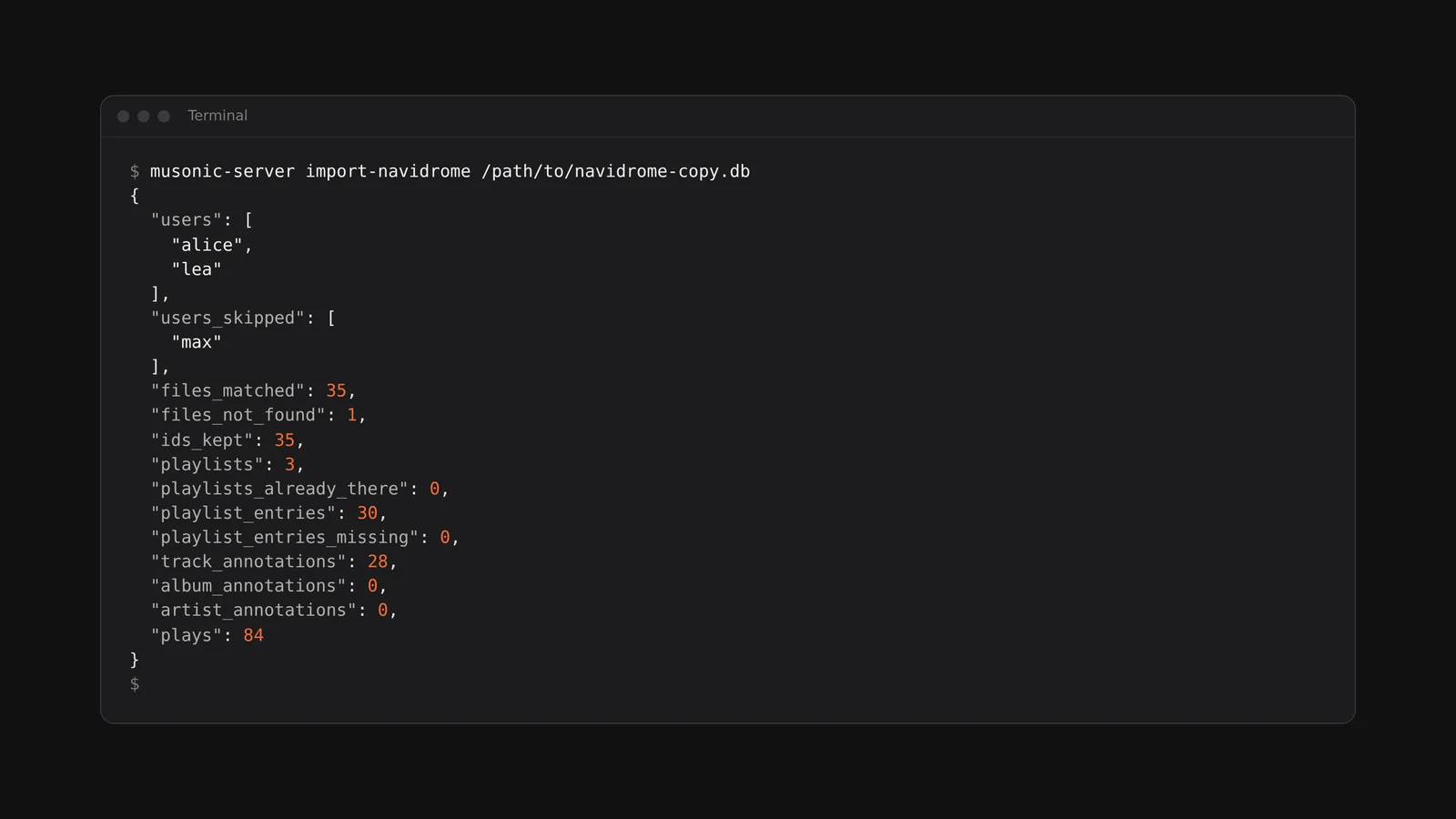
-
Read the report, fix, and run it again if needed.
An account listed under
users_skipped: create it (step 6) and run the import again. Manyfiles_not_found: the two servers do not see the same music folder (see Troubleshooting). -
Give each person their new password.
Passwords are not imported. If you created the account with
user add, give the person the password you chose. Better: in the admin console, open the account, click Password reset link, then Create the link, and send the link: they choose their own password with it, used once.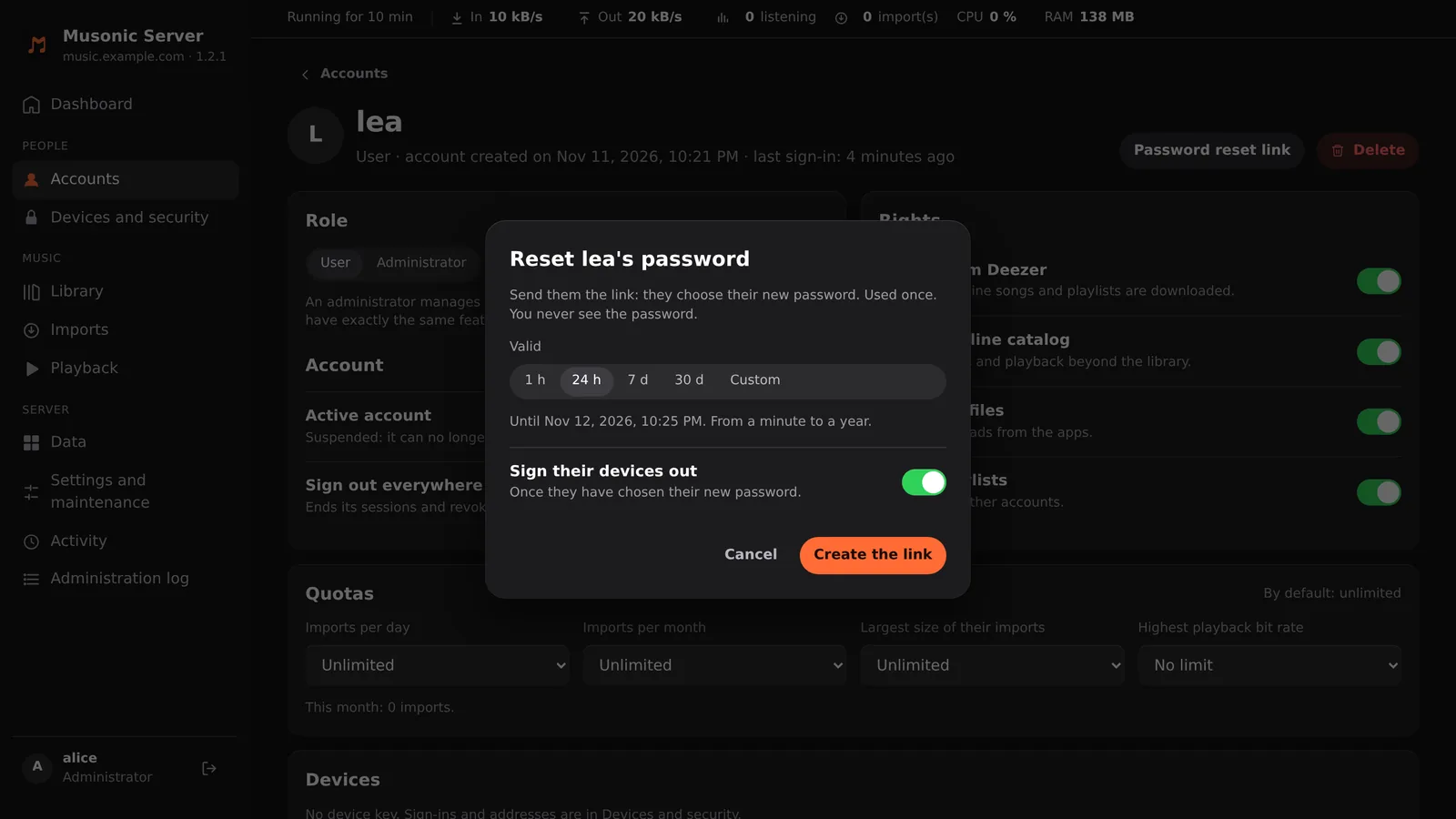
-
Connect one app to Musonic, and check everything.
In a Subsonic app (Symfonium, Substreamer…), add a server with the address of Musonic (for now, port 4534) and the Musonic user name and password. In the Musonic app, add the server the same way. Then go through the validation checklist.
-
Switch the reverse proxy to Musonic.
Once everything is validated, change your reverse proxy (Caddy, nginx, Traefik…) so that the address your apps use points to Musonic (
127.0.0.1:4534) instead of Navidrome. Then stop Navidrome. Do not delete it, nor its data: they are your way back. -
Reconnect the apps.
If the address stays the same, each app only needs the new password (and the same user name). Otherwise, change the address too. Nothing else changes for a Subsonic app.
Validation checklist
Section titled “Validation checklist”Before switching, compare the two servers side by side, in the same app or in both web interfaces:
- Library: about the same numbers of songs, albums and artists. In Musonic, the console’s Library page gives the number of songs. Musonic groups albums and artists from the tags in its own way: small differences are normal, big ones are not.
- Covers: open a few albums, including ones with a cover file in the folder and ones with a cover in the tags.
- Playlists: each person finds their playlists, with the same songs in the same order (minus the entries reported missing).
- Likes and ratings: the liked songs, albums and artists are there.
- Play counts: a song you played often shows about the same count.
- Playback: play an imported playlist from start to end, in each app people use, on Wi-Fi and on mobile data.
- Each account: every person signed in at least once with their new password.
Reading the report
Section titled “Reading the report”The import prints a summary in JSON:
| Field | Meaning |
|---|---|
users |
Accounts imported (same user name in both servers). |
users_skipped |
Navidrome accounts with no account of that name in Musonic: nothing imported for them. |
files_matched / files_not_found |
Navidrome files found in the Musonic library, and not found. |
ids_kept |
Songs that took their Navidrome id. |
playlists / playlists_already_there |
Playlists imported now, and already imported before (left as they are). |
playlist_entries / playlist_entries_missing |
Songs put in playlists, and songs left out because their file is not in the library. |
track_annotations, album_annotations, artist_annotations |
Songs, albums and artists with a like, a rating or a play count. |
plays |
Plays added to the history. |
Options
Section titled “Options”| Option | Effect |
|---|---|
| (none) | Songs and playlists keep their Navidrome ids. Playlists already imported are left as they are. |
--new-ids |
Songs and playlists get new Musonic ids. Playlists already imported are then recognised by owner and name. |
--replace-playlists |
Playlists already imported are deleted and imported again from the copy. |
Troubleshooting
Section titled “Troubleshooting”not a Navidrome database (no media_file table): the file given is notnavidrome.db, or the copy is empty. Make the copy again (step 2).… not found: the path is wrong. With Docker, the path is the one inside the container (/data/navidrome-copy.db), not the one on the machine.- Almost every file in
files_not_found: the music folder of Musonic is not the same as Navidrome’s (a parent or a subfolder), or Navidrome recorded its paths differently. Give Musonic the same folder as Navidrome, runscan, then the import again. - An account has nothing: check
users_skipped, and that the user name is the same in both servers.
If the import stops with an error, nothing is written: it runs in one transaction.
Going back to Navidrome
Section titled “Going back to Navidrome”The import only reads the copy of navidrome.db, opened read-only. Navidrome itself is never touched. To go back:
- Start Navidrome again, if you had stopped it.
- Point the reverse proxy back to Navidrome (port 4533).
- Reconnect the apps with the Navidrome passwords.
What happened in Musonic in between (new likes, new playlists, plays) stays in Musonic: it does not go back to Navidrome.