
Privacy and network
This page lists every connection Musonic makes besides the one between your apps and your own server: who is contacted, what is sent, when, and how to turn it off. It is for anyone who wants to know where their data goes, and for administrators who must tell their users.
In short
Section titled “In short”- No analytics, no tracking, no advertising, no crash reporting in the server, the Android app, the web player or this website. Musonic has no account of its own and no central server: I receive nothing.
- Your music files never leave your server. The apps get them from your server only.
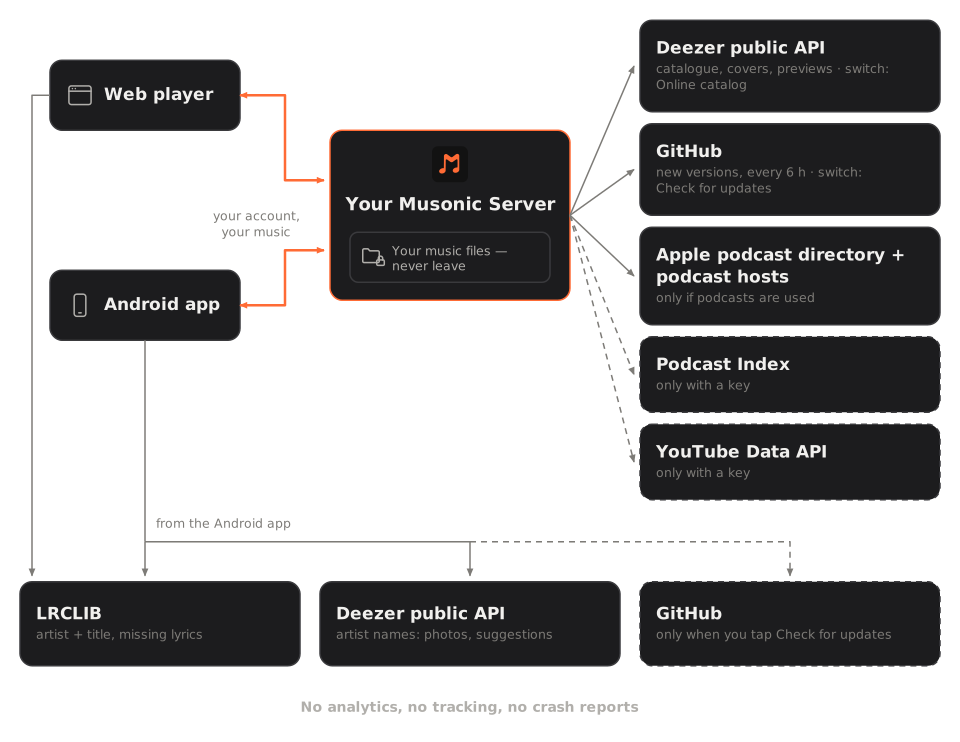
- The server contacts the internet for: Deezer’s official public API (online catalogue, covers, 30-second previews), GitHub (new versions), Apple’s podcast directory and the podcast hosts (only when podcasts are used), Podcast Index and the YouTube Data API (only if an administrator adds a key). Each one can be turned off or is off by default.
- The Android app also contacts, directly from the phone: LRCLIB for lyrics the server does not have, Deezer’s public API for artist photos, popular songs and similar artists, and GitHub when you tap Check for updates. There is no setting to turn off the first two today.
- The web player contacts your server and LRCLIB only. It loads no font, script or picture from anyone else.
- This website sets no cookie, has no analytics and serves its own font.
- Every service contacted sees the public IP address of the device that contacts it, like any website you visit: LRCLIB and Deezer see your phone’s address when the app asks them directly, the server’s address when the server asks; GitHub sees the address of what checks for updates; podcast hosts see your server’s address. No Musonic account, name or password is ever sent to them, but this usual network information is visible to them.
Musonic Server
Section titled “Musonic Server”| Who is contacted | What is sent | When | How to turn it off |
|---|---|---|---|
Deezer public API (api.deezer.com) and Deezer’s picture and preview servers |
Search words, ids of albums, artists and songs, the address of a cover or a preview. No account, no name of your users. | When someone searches, opens an online album or artist, likes or adds an online song, imports a Deezer playlist, or plays a 30-second preview. Covers of online albums are fetched by the server and kept in its picture cache. | Console Imports › Online catalog (setting online, variable MUSONIC_ONLINE=false). Previews alone: 30-second previews (online_previews, MUSONIC_ONLINE_PREVIEWS=false). |
GitHub API (api.github.com) |
A request for the list of Musonic releases, with the user agent musonic-server/<version>. |
Every 6 hours, from the start. Also when an administrator opens Musonic Web on this server in the console, and when they install it (the file is downloaded from GitHub). | Console Settings and maintenance › Check for updates (update_check, MUSONIC_UPDATE_CHECK=false). Off, the console page Musonic Web on this server asks GitHub nothing either (since 1.2.3). |
Apple’s podcast directory (itunes.apple.com/search) |
The words typed in a podcast search. | When someone searches for a podcast. Results are kept a day. | Do not use podcast search. There is no switch. |
| Podcast hosts (the address in each feed) | A request for the feed, the episode audio, its picture or its transcript, from the server’s address. | Every hour for the shows someone follows (an unchanged feed answers in one short reply), and when an episode is played. Episodes are relayed by the server: the host never sees the listener’s address. Only public internet addresses are fetched. | Follow no show. |
Podcast Index (api.podcastindex.org) |
Search words, signed with the administrator’s key. | Only if a key is set (console Imports › Podcast Index key, or MUSONIC_PODCASTINDEX_KEY and MUSONIC_PODCASTINDEX_SECRET), when someone searches for a podcast. |
Off by default: set no key, or remove it. |
YouTube Data API (www.googleapis.com/youtube/v3) |
The id of the playlist being imported, with the administrator’s key. | Only if a key is set (console Imports › YouTube Music import), when someone imports a YouTube or YouTube Music playlist. | Off by default: set no key, or remove it. |
ListenBrainz (api.listenbrainz.org) and Last.fm (ws.audioscrobbler.com) |
For each play of an account that connected the service: the artist, title, album, length, track number, MusicBrainz id and ISRC when known, and the time of the play; « now playing » the same way. With that account’s token or Last.fm session. | Only for the accounts that connected a service in their settings (Scrobbling). Last.fm also needs the administrator’s Last.fm key. | Off by default: each account connects or disconnects itself. Remove the Last.fm key in the console to stop Last.fm for everyone. |
| An audio provider the administrator plugs in (an import folder, a direct address, another Subsonic server) | What that provider needs to find a song (title, artist, ids). | When an online song is played or imported. | Plug in no provider. See Online catalogue and imports. |
The server sends nothing else: no statistics, no error reports, no “phone home”.
The Android app
Section titled “The Android app”| Who is contacted | What is sent | When | How to turn it off |
|---|---|---|---|
| Your server | Your account’s device key (or, on other Subsonic servers, a token), what you browse and play. | All the time you use the app. | — |
LRCLIB (lrclib.net) |
The artist, the title and the length of the song. The user agent says Musonic. Your server address and account are not sent. |
When the full-screen player (or the lyrics screen in Android Auto) shows a song for which your server has no lyrics. | No setting. Lyrics embedded in your files are used first and never cause this request. |
Deezer public API (api.deezer.com) and Deezer’s picture servers |
Artist names; ids of Deezer artists and albums. | Artist pages (photo, popular songs, similar artists), artist photos in search results when your server has none, the online suggestions of the Home and Search pages, autoplay and the magic shuffle. | No dedicated setting. Offline mode stops the Home and Search suggestions. |
GitHub API (api.github.com) |
A request for the list of Musonic releases. | Only when you tap Check for updates in your profile. Never on its own. | Do not tap it. |
The app contains no analytics, advertising or crash-reporting library. It does not use Google services for anything.
The web player
Section titled “The web player”The web player is a set of static files: either served by your own server (at /app/), or the copy hosted on this website at musonic.doodz.dev/app/ (served by GitHub Pages, like the whole website).
| Who is contacted | What is sent | When | How to turn it off |
|---|---|---|---|
| Your server | Your session (device key or token), what you browse and play. Covers and podcast pictures also come through your server. | All the time you use it. | — |
LRCLIB (lrclib.net) |
The artist, the title and the length of the song, from your browser. | When the lyrics are shown for a song your server has no lyrics for. | No setting. |
| The host of the files (your server, or GitHub Pages for the hosted copy) | The usual request of a browser loading a page (your IP address, your browser). | When you open the web player. | Use the copy served by your own server. |
The web player loads no font, script, picture or style from a third party: it uses your system’s fonts. It has no analytics and no service worker.
This website
Section titled “This website”- No cookie, no analytics, no advertising, no third-party script.
- The font (Inter) is served by the site itself, not by Google Fonts.
- The site is hosted on GitHub Pages: GitHub receives the usual request of any visit.
- What your browser stores, only for your own convenience and never sent anywhere:
musonic-lang(local storage): the language you picked with the EN / FR link. The web player hosted here reads the same choice.starlight-theme(local storage): the light or dark theme chosen in the documentation.sl-sidebar-state(session storage, deleted when the tab closes): which documentation menu groups are open.
What is stored on your phone
Section titled “What is stored on your phone”- Your password is not kept. On Musonic Server, the app keeps a device key made for that phone; on another Subsonic server, a fixed token (or the password only for servers that refuse tokens). A device key can be revoked from the console (Devices and security) or by signing out.
- Settings, accounts, the queue, caches and the search history are in the app’s private storage (an MMKV file). This file is not encrypted by Musonic today; it is protected by Android’s app sandbox, and the app forbids Android’s cloud backup (
allowBackup="false"). - Downloaded songs and their covers are files in the app’s storage, deleted with the app.
In the web player, the session is kept in the tab’s session storage (gone when the tab closes), or in local storage only if you tick Remember me. The password itself is never stored.
What is stored on the server
Section titled “What is stored on the server”| What | How |
|---|---|
| Passwords | Hashed with argon2id. With Legacy Subsonic sign-in on (legacy_auth, on by default, needed by Subsonic apps that sign in with a token; not by Musonic Web nor the Musonic app, which use device keys), a copy is also kept encrypted with AES-256-GCM, with a key outside the database (MUSONIC_SECRET_KEY, else secret.key in the data folder, readable by its owner only). |
| Device keys and session tokens | Random, stored only as SHA-256 hashes. |
| Likes, playlists, plays, play queues, podcast positions | In the database musonic.db, for each account. |
| The journal (sign-ins, refused sign-ins, administrator actions) | In events.db, with the time, the account, the IP address and the app. Limited in size (50 MB by default, set in the console): the oldest lines go first. |
| Keys of providers, Podcast Index and YouTube | In the database. Keep downloaded backups somewhere safe. |
| Daily backups | Copies of the database in the data folder (backups), 14 days by default (backup_days). |