
How Musonic works
This page explains the parts of Musonic and how they fit together, so you know what you have to install. Read it first if you are new to Musonic, whether you will use someone else’s server or run your own.
In short: Musonic Server reads and watches your music folder, on a machine that stays on. It sends the music to the Android app and to the web player (computer, iPhone, iPad), and the car gets it through the phone with Android Auto. Your likes and playlists stay in sync between all of them. The console, for administrators, is part of the server.
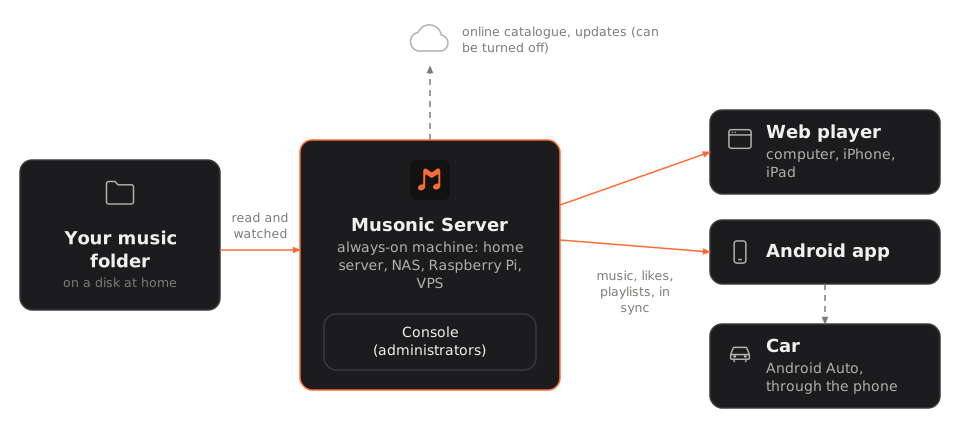
The three parts
Section titled “The three parts”| Part | What it is | Where it runs |
|---|---|---|
| Musonic Server | The program that holds your music library: it reads your music folder, keeps the accounts, the likes, the playlists and the plays, and sends the music to the apps. | On one machine that stays on: a home server, a NAS, a Raspberry Pi, a rented server (VPS). |
| The apps | What you listen with: the Android app, and the web player in any browser. On iPhone and iPad, you use the web player and add it to the home screen: there is no iOS app. | On your phone, your computer, your tablet. In the car through Android Auto, from the Android app. |
| The console | The administration pages of the server: accounts and invitations, library, imports, settings, backups. | Inside Musonic Server: you open the server’s address in a browser. Only administrators can sign in. |
Your music files stay on the disk of the machine that runs the server. The apps ask the server for each song when you play it (and can keep songs for offline listening).
Musonic Server also speaks the Subsonic API: other Subsonic apps (Substreamer, Symfonium and others) can sign in to it as well, and the Musonic apps can sign in to other Subsonic servers.
What you need to install
Section titled “What you need to install”Someone already runs a Musonic Server for you (a relative, a friend):
- You install only an app: the Android app, or the web player on a computer or an iPhone.
- You need the server’s address (for example
https://music.example.com) and an account. Usually the administrator sends you an invitation link: you open it, choose your name and password, and sign in to the app with them. - You do not need anything else on this site except the pages about the apps.
You want your own Musonic Server:
- Install Musonic Server on a machine that stays on (with Docker, the simplest, or without Docker).
- Create your administrator account and do the first start in the console.
- Make the server reachable from outside your home with HTTPS, if you want to listen away from home.
- Install the apps and sign in, then invite the people you want.
The machine for the server
Section titled “The machine for the server”| What | Details |
|---|---|
| A machine that stays on | The apps can only play what the server sends: when it is off, only the songs kept offline play. A home server, a NAS that runs Docker containers, a Raspberry Pi, an old computer, or a rented server (VPS) all work. |
| Linux, 64-bit | Musonic Server is published for Linux x86_64 (most PCs and servers) and Linux ARM64 (aarch64: Raspberry Pi 3, 4, 5 and other ARM boards with a 64-bit system). There is no 32-bit ARM build. |
| Docker (recommended) | The Docker image ghcr.io/doodzdev/musonic-server exists for both architectures and already contains ffmpeg and the console. Without Docker, a single program per architecture is attached to each server release. |
| ffmpeg | Used to make songs lighter when an app asks for a lower bit rate (mobile data). Included in the Docker image; install it yourself without Docker. Without it, files are sent as they are. |
| Your music in a folder | Any folder the server can read, with your files sorted as you like. |
| Disk space | The database, the caches and the daily backups go in a data folder next to the server. |
What talks to what
Section titled “What talks to what”- Your sign-in goes only to your server. The apps send the account name and password (or a per-device key) to it, never to anyone else. They also ask two public services for extras, with no Musonic account, name or password (like any website, they do see the IP address that contacts them): Deezer’s public catalogue (artist pictures, suggestions) and LRCLIB (lyrics a song lacks). Every request is listed here.
- The server reads your music folder and watches it: a file you add shows up on its own.
- The server goes on the internet for a few things, that you can turn off: the online catalogue (Deezer’s official public API, for song information, covers and 30-second previews; setting
MUSONIC_ONLINE), the check for new versions on GitHub (MUSONIC_UPDATE_CHECK), and podcasts when someone uses them. Details in Privacy and network. - Full songs that are not in your folder only come from an audio provider an administrator plugs into the server. Without one, online songs play as 30-second previews. See Online catalogue and imports.