
Podcasts on your server
This page is for the person who runs the server: how podcasts work on the server side, what it contacts, what it keeps, and the one optional setting. Listening to podcasts in the apps needs nothing from you.
What you need
- Nothing, for podcasts to work: they are on as soon as the server runs.
- Optionally, an administrator account and a free key from Podcast Index, for a wider search (see Widen podcast search).
How it works
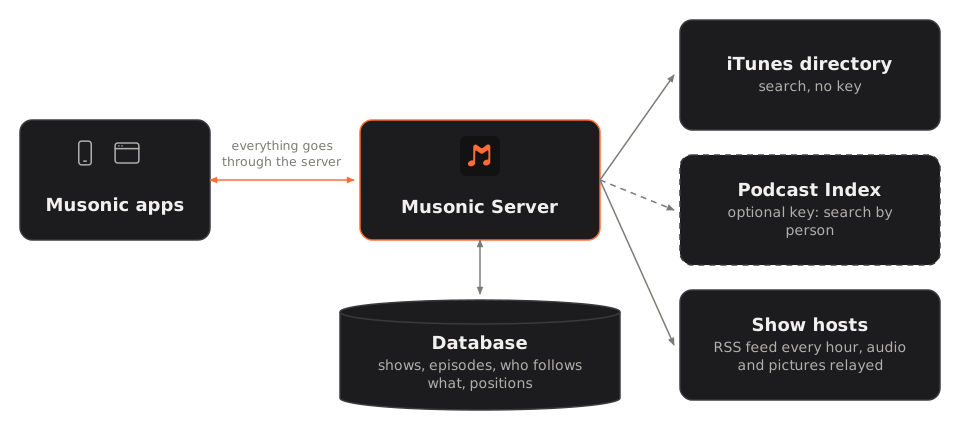
Section titled “How it works”- Search goes, from your server, to the iTunes podcast directory (no key needed). Results are kept for a day. With a Podcast Index key, the server also searches Podcast Index at the same time: it finds shows the iTunes directory misses or lists without their feed, and episodes where a person speaks (as host or guest).
- Following a show reads its RSS feed at once. The server understands RSS 2.0 with the iTunes and Podcasting 2.0 tags most hosts publish: duration, chapters, transcripts. Items without audio are skipped.
- Every hour, the server reads again the feed of every show someone follows, one after the other. It sends the feed’s last
ETag/Last-Modified, so an unchanged feed costs one short answer. A show is also read again when someone opens it and it was last read over an hour ago. Clients that have a “refresh podcasts” action (SubsonicrefreshPodcasts) start a refresh of every followed show in the background. - Episodes play through your server: it relays the audio from the show’s host, with seeking. The host sees your server’s address, never your listeners’. Episode pictures come from the host too, through the server.
- Transcripts published by a show (
podcast:transcript, WebVTT or SRT) appear in the apps like synced lyrics.
The apps never contact these services themselves: everything goes through your server, and its database keeps the shows, the episodes, who follows what and each account’s position.
What is stored, and for whom
Section titled “What is stored, and for whom”| Kept | Where | Shared or per account |
|---|---|---|
| Shows and their episodes (titles, descriptions, dates, durations, addresses) | The database (musonic.db in the data folder) |
Shared: a show followed by two accounts is read once. |
| Who follows which show | The database | Per account. |
| Where each account stopped in each episode, and what it finished | The database | Per account. An episode counts as listened past 95 %. |
| Episode audio | Not kept: relayed from the host at each listen | — |
A show that someone only looked at (never followed, nobody’s position in it) is removed after a week. When an account stops following a show, the show stays as long as someone else follows it.
Widen podcast search
Section titled “Widen podcast search”A Podcast Index key is free, and optional. It adds search by person and the shows the iTunes directory misses.
-
Create a free account at api.podcastindex.org/signup.
Podcast Index gives you an API Key and an API Secret.
-
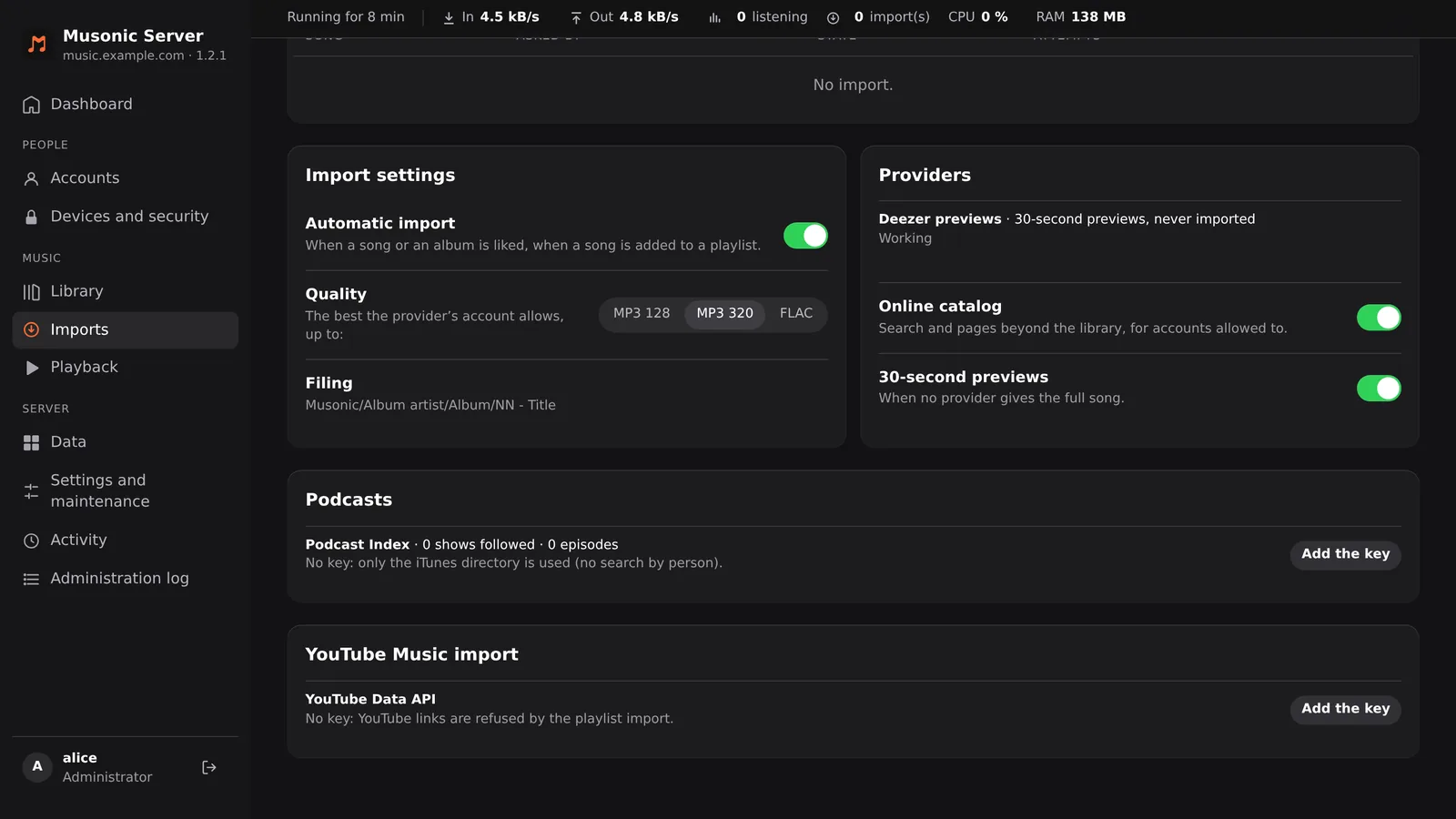
In the console, click “Imports” in the “Music” section of the menu, and scroll down to “Podcasts”.
The block sits under Import settings and Providers, above YouTube Music import. Its line “Podcast Index · … shows followed · … episodes” gives the counts, and the line below says whether a key is set (without one: “No key: only the iTunes directory is used (no search by person).”). Add the key is on the right.
-
Click “Add the key”.
-
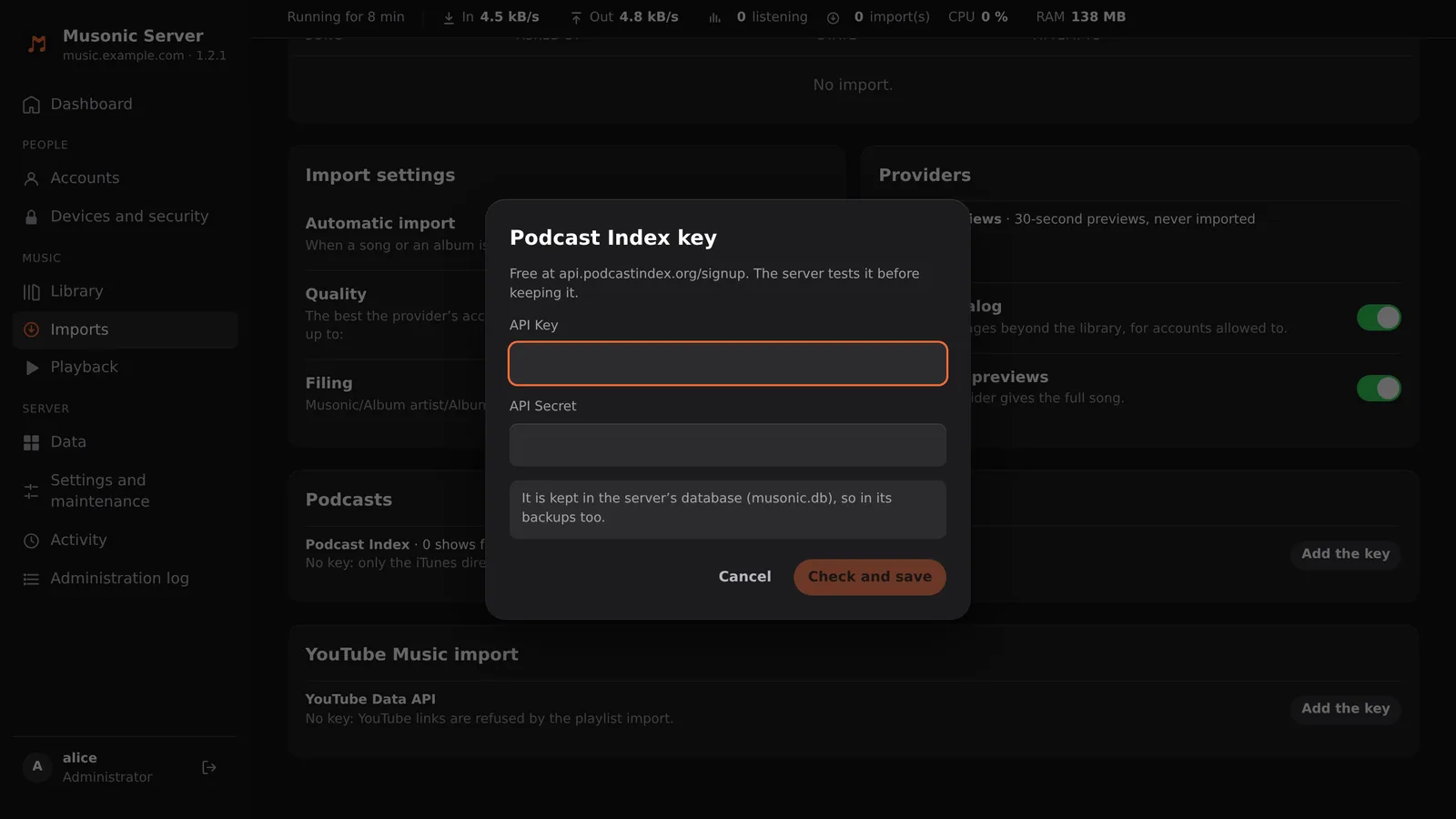
Paste the API Key and the API Secret, then click “Check and save”.
The “Podcast Index key” window has the API Key field first, then API Secret. The server tests the key with Podcast Index before keeping it. If it is refused, check you copied both values whole.
-
Check the block now says the search by person is on.
It applies at once, no restart needed.
You can also set the key in the environment instead of the console. A key saved in the console wins over the environment.
environment: MUSONIC_PODCASTINDEX_KEY: "<api-key>" MUSONIC_PODCASTINDEX_SECRET: "<api-secret>"Then docker compose up -d. <api-key> and <api-secret> are the two values Podcast Index sent you.
export MUSONIC_PODCASTINDEX_KEY="<api-key>"export MUSONIC_PODCASTINDEX_SECRET="<api-secret>"Then start musonic-server again.
Limits and safety
Section titled “Limits and safety”- Only public addresses. Feeds, audio and pictures are fetched only from addresses on the public internet: a feed pointing at your local network, at
localhostor at another container is refused. A podcast hosted only on your home network cannot be followed. - A feed larger than 20 MB, or a picture larger than 15 MB, is refused. Requests to hosts give up after 20 seconds.
- There is no setting to turn podcasts off, and no per-account right for them: every account can search and follow shows.
- What the server contacts: the iTunes directory for searches, Podcast Index when a key is set, and the hosts of the shows your accounts follow or open.
Next steps
Section titled “Next steps”- Online catalogue and imports: the music the server finds beyond your files.
- Scanning your library: your own music files.