
Architecture
This page explains how the Musonic project is put together, for developers who want to read the code, build it or contribute. Everything lives in one Git repository, github.com/DoodzDev/Musonic.
In short: the Android app, Musonic Web and the administration console share the TypeScript code of packages/core; they and the other Subsonic apps reach Musonic Server (Rust) over HTTPS. The server answers the Subsonic API on /rest and the Musonic API on /v1 and /v1/events, and serves the console (/) and Musonic Web (/app/). It uses the music folder, SQLite (musonic.db), ffmpeg, the online catalogue (Deezer’s public API: metadata and 30-second previews) and the audio providers.
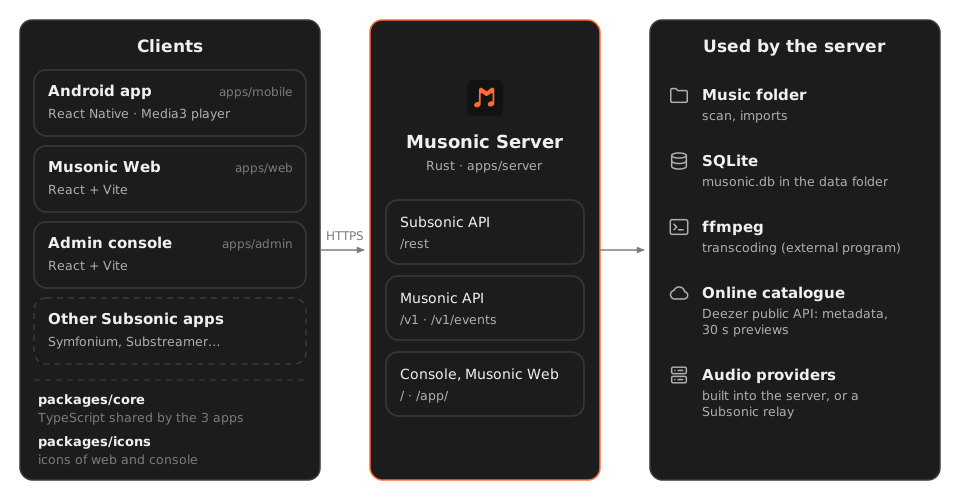
The repository
Section titled “The repository”| Folder | What it is | Built with |
|---|---|---|
apps/mobile |
The Android app (version 2.4.0). | React Native 0.85, React 19, TypeScript; native Kotlin code for the player and the car. |
apps/web |
Musonic Web, the web player (version 1.2.0). Served at /app/ of the website and, once installed from the console, by each server. |
React 19, Vite, TypeScript. |
apps/admin |
The administration console, served by the server at its own address. | React 19, Vite, TypeScript. |
apps/server |
Musonic Server (version 1.2.1). | Rust (1.89 or later), axum, tokio, SQLite (rusqlite), ffmpeg as an external program. |
packages/core |
@musonic/core: the TypeScript code shared by the apps. |
TypeScript, tested with Vitest. |
packages/icons |
@musonic/icons: the icons of the web apps, generated from the mobile app’s icon set. |
A Python script (npm run generate). |
site |
This website. | Astro and Starlight. |
The root package.json declares an npm workspace with apps/web, apps/admin, packages/core and packages/icons. The mobile app keeps its own dependencies and is not part of the workspace.
The Android app
Section titled “The Android app”The interface and the playback logic (queue, shuffle, repeat, crossfade decisions) are in TypeScript (apps/mobile/src). Sound is played by native code in apps/mobile/android:
MusonicPlayerService: ExoPlayer (AndroidX Media3) with audio offload, so the audio chip decodes while the screen is off, inside a Media3 session that shows the notification and the lock screen controls and serves Android Auto.MusonicPlayerModule: the bridge through which the TypeScript engine drives that player.MusonicCarAppServiceand theMusonicAuto…andMusonicCar…classes: the car screens, with the AndroidX Car App library.
The server
Section titled “The server”apps/server/src is split by subject:
| Module | Role |
|---|---|
server |
The HTTP router, compression, CORS, security headers, /health. |
subsonic |
The Subsonic / OpenSubsonic API (/rest), its answer cache, streaming and covers. |
api |
The native API (/v1), including the console’s routes and the /v1/events WebSocket. |
events, connect |
Real-time events and Musonic Connect. |
library |
Scanner, folder watcher, tags, imports into the library, Navidrome import. |
online |
The online catalogue (Deezer’s public API: metadata and 30-second previews). |
providers, stream, remote |
The audio provider interface and the shared segment cache of their streams. |
playlist_import, matcher |
Playlist imports and song matching. |
podcasts |
Feeds, directory, episodes, transcripts. |
users |
Accounts, argon2 password hashes, sessions, API keys, the sign-in limiter. |
db |
SQLite and its migrations. |
journal, metrics, logs |
The console’s activity journal, measures and recent log lines. |
config, settings |
Configuration (TOML file and environment) and the settings changed in the console. |
webapp |
Musonic Web hosted at /app. |
How audio reaches tracks that are not files in your library is described in apps/server/docs/PROVIDERS.md.
The path of a request
Section titled “The path of a request”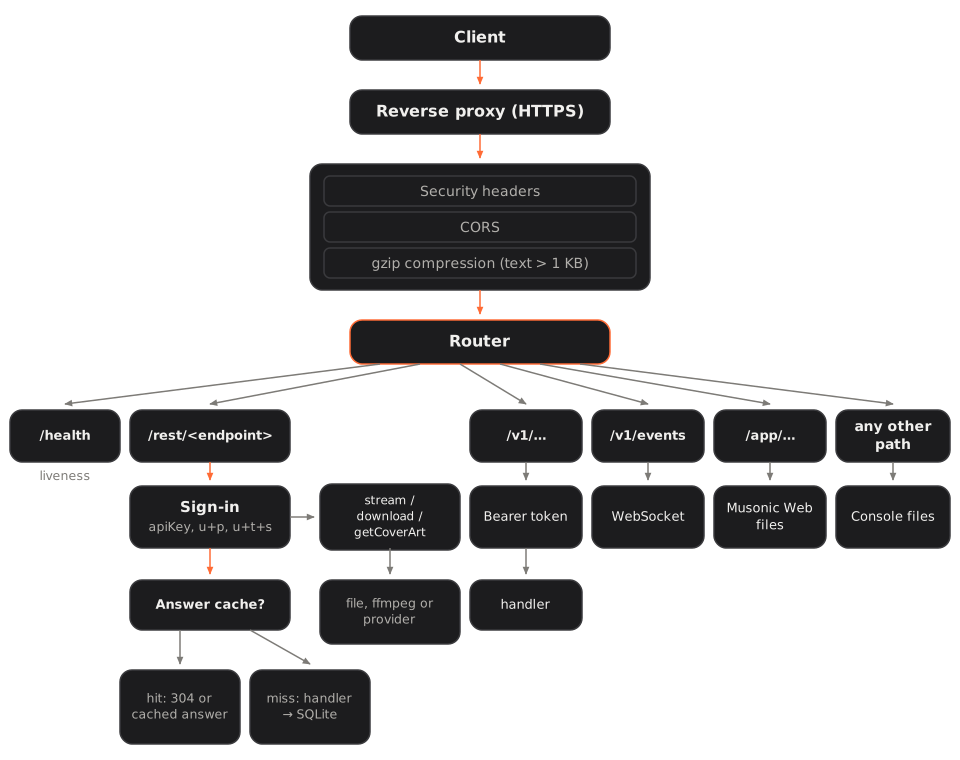
- The client calls the server, usually through a reverse proxy that adds HTTPS.
- Every answer goes through three layers: security headers, open CORS, and gzip compression of text answers over 1 KB.
- The router sends the request to:
/health: liveness only;/rest/<endpoint>: the Subsonic API. The server reads the parameters, checks the credentials (API key, password, or token and salt), then looks in the answer cache. A kept answer is sent at once, with itsETagand its gzip version. Otherwise the handler reads SQLite (and the online catalogue fordz-…ids), renders XML or JSON, and keeps the answer when the route is cacheable;stream,download,getCoverArt: binary answers. A file of the library is sent with HTTP ranges, or transcoded by ffmpeg; a track without a file comes from the first audio provider that has it;/v1/...: the native API, with a Bearer token (session or API key);/v1/events: the WebSocket of real-time events;/app/...: the files of Musonic Web, when installed;- any other path: the console’s files (or a short “Musonic Server is running” page when the console is not installed).
The full list of routes is in the HTTP API reference.
Database
Section titled “Database”- SQLite, one file:
musonic.dbin the data folder. WAL mode, foreign keys on, 5-second busy timeout. - One connection behind a lock, used from blocking threads: enough for a personal server with thousands of tracks and a few accounts.
- Migrations are SQL files in
apps/server/migrations(0001_initial.sqlto0010_connect.sqlin 1.2.1), built into the program and applied in order when the database opens.PRAGMA user_versionholds how many are applied; each runs in its own transaction. A released migration is never edited: a new one is added. - Before migrating an existing database, the server copies it to
musonic.db.before-schema-<n>, so an update that goes wrong can be undone by hand. A database newer than the program is refused (“update the server”). - The activity journal of the console is a separate file,
events.db. - Daily backups go to
backups/(backup_days, 14 kept by default).
What the data folder holds:
| Path | Content |
|---|---|
musonic.db |
The database. |
events.db |
The activity journal. |
secret.key |
The key that encrypts the passwords kept for Subsonic token sign-in (unless MUSONIC_SECRET_KEY is set). |
backups/ |
Daily database backups. |
cache/covers/ |
Resized covers. |
cache/transcoded/ |
Transcoded songs (transcode_cache_mb). |
tmp/streams/ |
Streams from audio providers being played. |
web/ |
Musonic Web, when installed from the console. |
Caches
Section titled “Caches”| Cache | Where | How it stays right |
|---|---|---|
| Subsonic answers | Memory, 8 MB at most, answers up to 2 MB | Every write to the database moves a change counter; an answer is valid only at the count it was rendered at. The account is part of the key. The 16 most requested answers (out of 64 remembered) are rebuilt in the background 150 ms after the last write. |
| Gzip versions of those answers | Memory, with the answer | Made at the best level in the background, then served to every client. |
| Library snapshots | Memory | Ids of present tracks and albums (random lists), genres, album artists: rebuilt when the library changes. |
| Covers | cache/covers/ |
Resized on request, cached on disk; clients may keep them a day. |
| Transcoded songs | cache/transcoded/ |
Kept only when ffmpeg finished; the oldest go above transcode_cache_mb. |
| Provider streams | tmp/streams/ |
Split in 1 MiB segments, each fetched once and shared by every listener; the next ones are fetched ahead. Idle streams are freed (checked every 5 minutes). |
| Client side | packages/core |
An in-memory cache with expiry that shares requests in flight. |
Real-time sync
Section titled “Real-time sync”When something changes for an account (a like, a rating, a playlist, a play, the saved queue, an import), the server publishes an event to every device of that account through GET /v1/events, a WebSocket. It works whichever client made the change, Subsonic clients included.
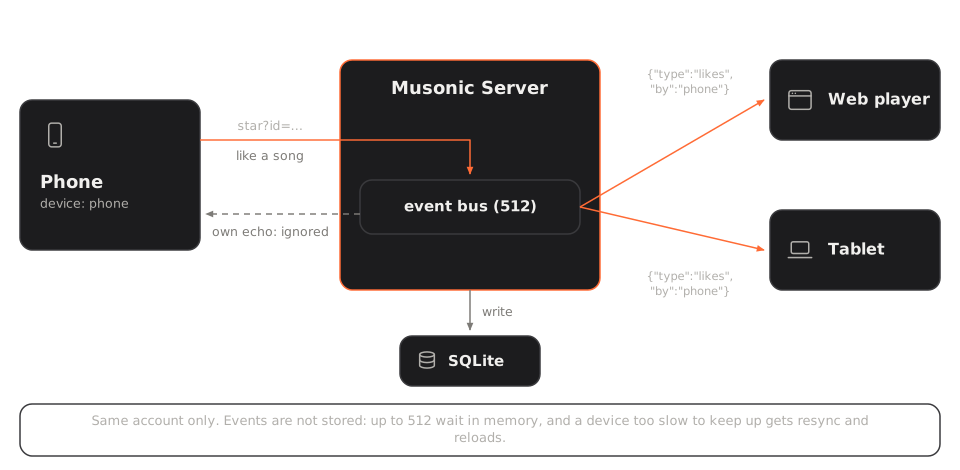
- Only the devices of the same account receive an event. Each event names the device that made the change (
"by", for example{"type":"likes","by":"phone"}), so that device ignores its own echo. - Events are not stored: up to 512 wait in memory, and a device too slow to keep up gets
resyncand reloads. - A
pingevery 30 seconds keeps connections open through proxies. - Musonic Connect (beta) uses the same WebSocket in both directions: devices register, send what they play and send remote commands. The server keeps their last state in memory and dates it with its own clock, so devices compute the position without comparing clocks. Which device pauses when another starts is decided by the devices themselves (
packages/core/src/connect).
Background work
Section titled “Background work”| Task | When |
|---|---|
| Library scan | At start-up, a few seconds after changes in the music folder, and every scan_interval_minutes (60 by default). Scans never overlap. |
| Imports into the library | When an online track is liked or added to a playlist, if import is on and a provider allows it. |
| Playlist imports | When an account starts one. |
| Podcast feeds | Every hour. |
| Database backup | Once a day, if backup_days is not 0. |
| Release check | Every 6 hours, if update_check is on (GitHub releases of the server and of Musonic Web). |
| Measures | Rates every 2 seconds, folder sizes every minute, for the console. |
Shared code
Section titled “Shared code”packages/core holds what the clients share, so the apps behave the same:
| Folder | Content |
|---|---|
subsonic/ |
The Subsonic client, sign-in (token, API key), device keys, types. |
server/ |
The types of the native API and of the events, generated from the Rust code with ts-rs (cargo test writes them to server/generated). |
home/ |
Building the home screen. |
playback/ |
The queue builder, crossfade, listen tracking (what counts as a play). |
connect/ |
The Musonic Connect client. |
ids/ |
Short ids and the conversion of old ids. |
lyrics/ |
Lyrics from LRCLIB. |
releases/ |
Reading release tags. |
cache.ts |
The in-memory request cache. |
Musonic Web and the console depend on @musonic/core through the npm workspace. The mobile app reads the same files directly: Metro watches packages/core and a Babel alias and TypeScript paths map @musonic/core/... to its sources.
Build and release
Section titled “Build and release”Each part has its own version and its own tag. Pushing a tag starts the matching GitHub Actions workflow:
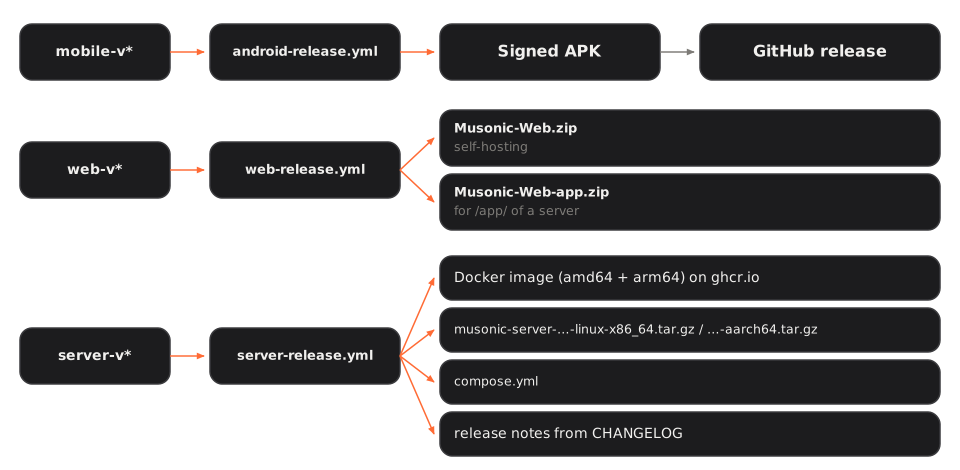
| Tag | Workflow | What it publishes |
|---|---|---|
mobile-v<version> |
android-release.yml |
The release APK, signed in CI, attached to a GitHub release “Musonic Mobile <version>”. |
web-v<version> |
web-release.yml |
Musonic-Web.zip (to host anywhere, with SELF-HOSTING.md) and Musonic-Web-app.zip (built for /app/, installed by the console). |
server-v<version> |
server-release.yml |
The image ghcr.io/doodzdev/musonic-server for linux/amd64 and linux/arm64, tagged <version>, <major>.<minor>, <major> and latest; the programs musonic-server-<version>-linux-x86_64.tar.gz and …-aarch64.tar.gz (with the console in admin/); compose.yml; release notes taken from apps/server/CHANGELOG.md. Not marked “latest” on GitHub, so download links keep pointing to the mobile release. |
The Docker image is built in three stages: the console with Node, the server with Rust on Alpine, then a small Alpine image with ffmpeg, running as user 1000, with a health check on /health.
Checks run on pull requests and on pushes to main, for the parts that changed:
| Workflow | Checks |
|---|---|
ci.yml (mobile) |
ESLint with no warnings, TypeScript, Jest. |
ci-web.yml (web, console, shared code) |
@musonic/core type check and tests, lint and build of Musonic Web and of the console, icons up to date with the mobile set. |
server-ci.yml |
cargo fmt --check, cargo clippy with warnings as errors, cargo test, cargo audit, generated TypeScript types up to date. |
On each push to main that touches them, pages.yml builds the website and Musonic Web (under /app/) and publishes them on GitHub Pages.
Licences
Section titled “Licences”The source code is public, under non-commercial licences (they are not OSI-approved licences):
| Folder | Licence |
|---|---|
apps/server |
PolyForm Noncommercial 1.0.0 (apps/server/LICENSE) |
Everything else (apps/mobile, apps/web, apps/admin, packages/…) |
Creative Commons BY-NC 4.0 (LICENSE at the root) |
See Licence for what this allows.
Contributing
Section titled “Contributing”The rules are in CONTRIBUTING.md. In short:
- Branches: one short branch per change, named with a prefix:
feat/,fix/,refactor/,docs/,chore/. - Commits: imperative mood, with the same prefix (
feat: add crossfade setting to player). - Pull requests: one logical change each, with the pull request template filled in (description, test plan, checklist). Run the same checks as the CI for the parts you touched (see the table above).
- Issues: use the templates, Bug report (steps, expected and actual behaviour, device) or Feature request (problem, proposed solution, alternatives).
- Code: TypeScript everywhere, no
anywithout a reason; user-facing strings of the mobile app go throughapps/mobile/src/i18n; comments only when the why is not obvious. - Building the Android app: Node 22.11.0 (
apps/mobile/.nvmrc), JDK 17 and 21, Android SDK platform 36 with Build-Tools 36.0.0, NDK 27.1.12297006 and CMake 3.22.1. Thedebugvariant installs as “Musonic Dev” (com.musonic.debug) next to the released app (com.musonic). The release key is never in the repository: official APKs are signed by the CI. - Running the rest locally:
npm run web(Musonic Web),npm run admin(console),npm run test:core(shared code) from the root;cargo run --releaseinapps/server.