Audio quality
This page follows the sound from your music file to your speaker or headphones, and says at each step what Musonic does and what it leaves to your phone, browser or car. It is for anyone who cares about sound quality or mobile data, and for administrators who set the server’s limits.
In short:
- By default, on Wi-Fi, the Android app and the web player receive your file as it is, not converted.
- The server converts a song (with ffmpeg) only when an app, an account limit or a server limit asks for a lower bit rate. The Android app does so on mobile data by default (192 kbit/s).
- Downloads in the Android app ask for the original file.
- Gapless playback depends on the player of your phone or browser; crossfade is a separate option, off by default.
- Musonic does not level the volume (no ReplayGain) and makes no bit-perfect promise: Android and your browser mix and may resample the sound.
The path of the sound
Section titled “The path of the sound”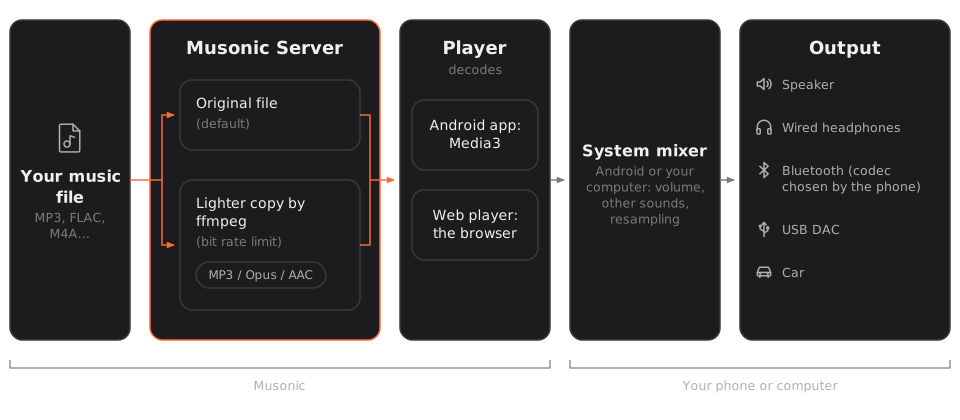
- The file sits in your music folder on the server (MP3, FLAC, M4A…).
- The server sends it to the app: either the file itself, or a lighter copy that ffmpeg makes on the fly (see When the server converts a song).
- The player decodes it. On Android, the app’s player (Media3/ExoPlayer, the “Android audio player” setting, on by default) turns the compressed file into sound. In the web player, the browser does it.
- The system mixer of the phone or computer mixes Musonic with the other sounds (notifications, navigation) and applies the system volume. This step is Android’s or your computer’s, not Musonic’s.
- The output: the phone’s speaker, wired headphones, Bluetooth headphones, a USB DAC, or the car. The quality of this last link (for example the Bluetooth codec) is chosen by your phone and the device, not by Musonic.
Lossy and lossless, simply
Section titled “Lossy and lossless, simply”| Lossless | Lossy | |
|---|---|---|
| What it is | An exact copy of the recording, only compressed like a zip file. | A smaller file: sounds people hardly hear are thrown away. |
| Common formats | FLAC, ALAC, WAV, AIFF, WavPack, APE | MP3, AAC (M4A), Opus, Vorbis (OGG), WMA |
| Size, one hour | Roughly 200 to 400 MB for CD quality FLAC (depends on the music) | About 145 MB at 320 kbit/s, 85 MB at 192, 60 MB at 128 |
| Converting it | Can be converted to a lossy format without loss beyond that format’s own. | Converting it again to another lossy format loses a little more each time. |
The bit rate (kbit/s) is how much data one second of sound uses. Higher means bigger files and, for lossy formats, better sound. A lossy copy can never bring back what was thrown away: converting an MP3 at 128 kbit/s to 320 kbit/s does not improve it, which is why the server never raises the bit rate of a file (see below).
Formats
Section titled “Formats”Musonic Server reads files with these extensions: mp3, flac, m4a, mp4, aac, alac, ogg, oga, opus, wav, aif, aiff, wv, ape, mpc, wma.
Reading a file (adding it to the library, its tags and cover) does not mean every app can play it as it is: that depends on the decoder of the phone or the browser. The table below gives the usual support; it varies with the device and the browser version.
| Format | Android app (Media3) | Chrome / Edge | Firefox | Safari (iPhone, Mac) |
|---|---|---|---|---|
| MP3 | Yes | Yes | Yes | Yes |
| AAC / M4A | Yes | Yes | Yes | Yes |
| FLAC | Yes | Yes | Yes | Yes (recent versions) |
| Opus | Yes | Yes | Yes | Recent versions |
| Vorbis (OGG) | Yes | Yes | Yes | Often not |
| WAV | Yes | Yes | Yes | Yes |
| ALAC (in M4A) | Depends on the phone | Often not | No | Yes |
| AIFF | Often not | Often not | Often not | Yes |
| WMA, APE, Musepack, WavPack | No | No | No | No |
When the server converts a song
Section titled “When the server converts a song”The server sends the file as it is unless a lower bit rate or another format is asked. Three things can ask for it, and the lowest limit wins:
| Who | Where it is set | Values |
|---|---|---|
| The app | Android app: Settings › Quality and downloads › Quality on Wi-Fi and Quality on mobile data. The web player has no quality setting: it always asks for the original. | Original, 320 kbit/s, 192 kbit/s, 128 kbit/s. Defaults: Original on Wi-Fi, 192 kbit/s on mobile data. |
| The account | Console: Accounts › the account › Quotas › Highest playback bit rate. | Any number of kbit/s, or empty for no limit. Administrators are never limited. |
| The whole server | Console: Playback › Highest bit rate by default (setting max_bit_rate, variable MUSONIC_MAX_BIT_RATE). |
No limit (default), 320, 256, 192, 128 or 96 kbit/s. |
Then, for each song, the server decides:
- The file’s bit rate is at or below the limit (or there is no limit): the file is sent as it is, with seeking.
- The file’s bit rate is above the limit: ffmpeg makes a lighter copy at the limit (never above 320 kbit/s). A lossless file is always above any limit, so it is converted.
- The format of the copy is the one the app asks for, if any (the Subsonic
formatparameter:mp3,opus,aac/m4a,ogg;rawmeans never convert). The Musonic apps do not ask for a format, so the server uses its own: console Playback › Format of smaller songs (settingtranscode_format, variableMUSONIC_TRANSCODE_FORMAT): MP3 (default), Opus or AAC. - The server never raises the bit rate: a 128 kbit/s MP3 asked at 192 kbit/s is sent as it is.
| Format of the copy | Encoder used by ffmpeg | Bit rate |
|---|---|---|
| MP3 | libmp3lame |
The limit (max 320 kbit/s) |
| Opus | libopus |
The limit (max 320 kbit/s) |
| AAC | aac (ffmpeg’s own) |
The limit (max 320 kbit/s) |
Vorbis (only when an app asks format=ogg) |
libvorbis |
The limit (max 320 kbit/s) |
The copy has no tags (-map_metadata -1): the app already has the song’s information from the server.
Online songs
Section titled “Online songs”For a song of the online catalogue played through an audio provider plugged in by the administrator, the server asks the provider for MP3 at 320 kbit/s, or 128 kbit/s when the limit is 192 kbit/s or lower. Without a provider, online songs play as 30-second previews. See Online catalogue and imports.
The transcoding cache
Section titled “The transcoding cache”A converted song is kept on the server’s disk, so playing it again, or seeking in it, is immediate.
- Size: console Playback › Transcoded songs (setting
transcode_cache_mb, variableMUSONIC_TRANSCODE_CACHE_MB): None, 250 MB, 500 MB (default), 1, 2 or 5 GB. Beyond it, the songs not used for the longest time are removed. - A song is kept only once ffmpeg has finished it from the start: playback started in the middle of a song (
timeOffset) is not kept. - When the app has saved its play queue on the server, the server converts the next song in the background, one at a time for the whole server, so it starts at once.
- The Empty button next to Transcoded songs clears it.
Downloads keep the original
Section titled “Downloads keep the original”When the Android app downloads a song (by hand or with Automatic download), it asks for the file without a bit rate: you get the original file, whatever Quality on Wi-Fi or Quality on mobile data say.
Gapless playback
Section titled “Gapless playback”Some albums (live records, classical music, DJ mixes) have songs that flow into each other with no silence. Gapless playback means the player joins them exactly.
- Android app: the app hands the following songs to Android’s player (Media3) in advance, and Media3 joins them. For MP3 and AAC, a perfect join needs the encoder information in the file (most encoders write it); FLAC and WAV join naturally.
- Possible tiny gap on some phones. To save battery, the app lets the phone’s audio chip decode the music when crossfade is off (“audio offload”). Musonic does this even on phones that do not announce gapless support in that mode (
setIsGaplessSupportRequired(false)), because otherwise most phones would always decode on the main processor. On such phones a very short gap can be heard between two songs that should join. Setting a crossfade turns offload off. - Web player: the next song is loaded when the current one ends, so a short silence between songs is possible.
Crossfade
Section titled “Crossfade”Crossfade is something else: the end of one song fades out while the start of the next one fades in, overlapping. Gapless keeps the music exactly as recorded; crossfade changes it on purpose.
-
Open Settings.
-
In “Playback”, move the “Crossfade” slider.
From 0 s (off, the default) to 12 s.
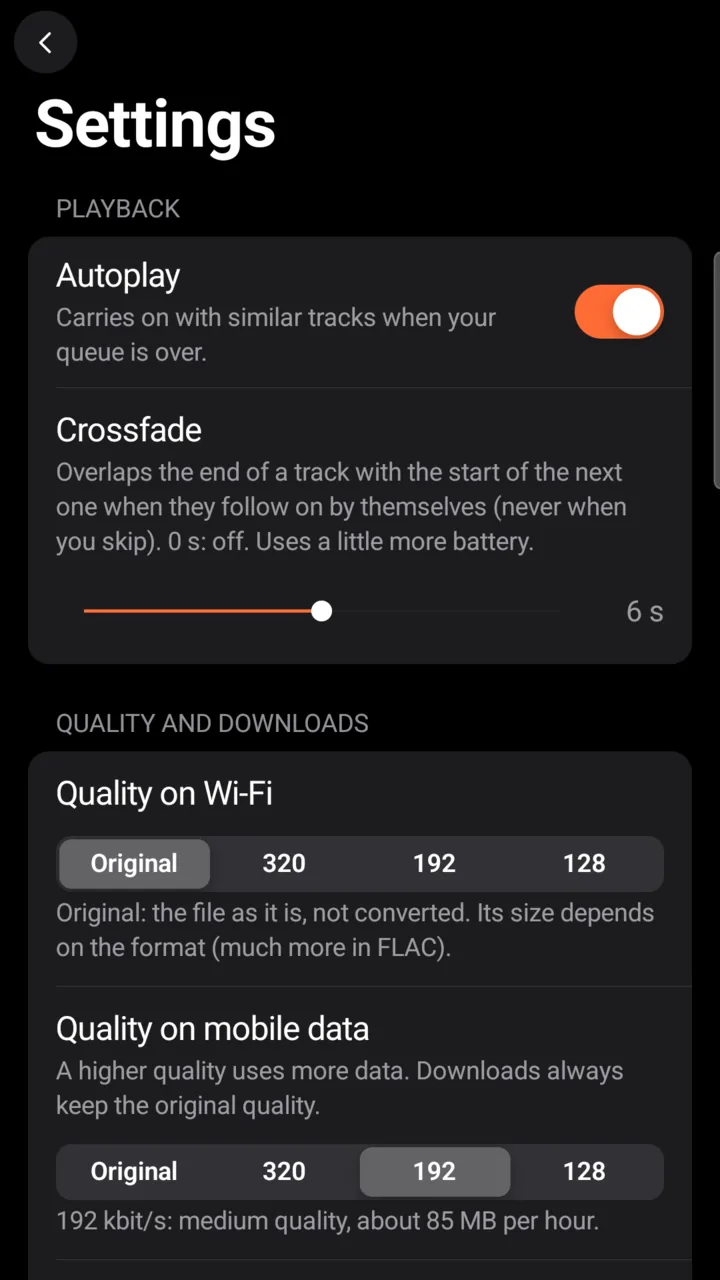
The fade is done by Android’s player itself, so it also works with the screen off. With Settings › Advanced options › Android audio player turned off, the app uses its older player, and the fade only happens while the app is on screen.
-
Open the settings of the web player.
-
Move the “Crossfade between tracks” slider.
From Off to 12 s.
The browser mixes the two songs with Web Audio.
On both, there is no crossfade:
- when you skip a song yourself (Next, Previous, or tapping another song);
- with repeat one;
- with the sleep timer set to the end of the track;
- at the end of the queue;
- on a song shorter than twice the fade;
- for podcast episodes.
Crossfade uses a little more battery on the phone: two songs play at once, and audio offload is off.
Volume levelling (ReplayGain)
Section titled “Volume levelling (ReplayGain)”Musonic does not support ReplayGain or any volume levelling yet: tags such as REPLAYGAIN_TRACK_GAIN are not applied, and songs play at the level they were mastered. The console lists Volume levelling as coming Later.
Hi-res and bit-perfect
Section titled “Hi-res and bit-perfect”- The server sends hi-res files (for example 24-bit / 96 kHz FLAC) as they are when no limit applies.
- On Android, the sound then goes through Android’s mixer, which usually converts it to the phone’s output rate before the speaker, the headphones or a USB DAC. Musonic has no exclusive USB mode and no bit-perfect mode: it does not bypass Android’s mixer.
- In a browser, the browser and the computer’s system mix the sound in the same way.
If bit-perfect playback to a USB DAC matters to you, Musonic is not the right tool for that part today.
Bluetooth and Android Auto
Section titled “Bluetooth and Android Auto”- Bluetooth: the codec (SBC, AAC, aptX, LDAC…) is chosen between your phone and your headphones or car. Musonic does not choose it. A lossless file sent over Bluetooth is converted by that codec anyway; on mobile data, a 320 kbit/s quality is often enough for Bluetooth.
- Android Auto: the car shows Musonic’s screens, but the sound comes from the phone, through the same player and the same quality settings, then to the car by USB or Bluetooth as the car and phone agree.
Known limits
Section titled “Known limits”- No ReplayGain or volume levelling.
- No bit-perfect output, no exclusive USB mode.
- No equalizer in Musonic (use the phone’s, if it has one).
- The web player has no quality setting: it always asks for the original file, and can only play the formats your browser can.
- The server does not convert a file just because the app cannot play its format: only a bit rate limit or a requested format triggers a conversion.
- A tiny gap between gapless songs is possible on phones without gapless support in audio offload; in the web player, a short silence between songs is possible.
- An account or server bit rate limit also applies to downloads.
- Without ffmpeg on the server, no song is ever made lighter.